SalesWorx has introduced the Harness Agent, a new AI-powered feature built specifically for customer support teams. This article explores how it works and the benefits it brings to support operations.
What the Harness Agent Does
When a customer raises a support ticket, a support engineer typically needs to read through the ticket description, review the full comment history, examine any attached files such as logs or reports, and consult the product manual to identify the correct fix. Depending on the complexity of the ticket, that process takes between thirty and sixty minutes.
The Harness Agent handles this investigation automatically. The engineer opens the ticket, sends it to the agent, and receives a structured resolution with three parts: the identified Cause, the documented Fix, and a Suggested Reply ready to send to the customer. The entire process completes in under three minutes.
How the Harness Agent Was Built
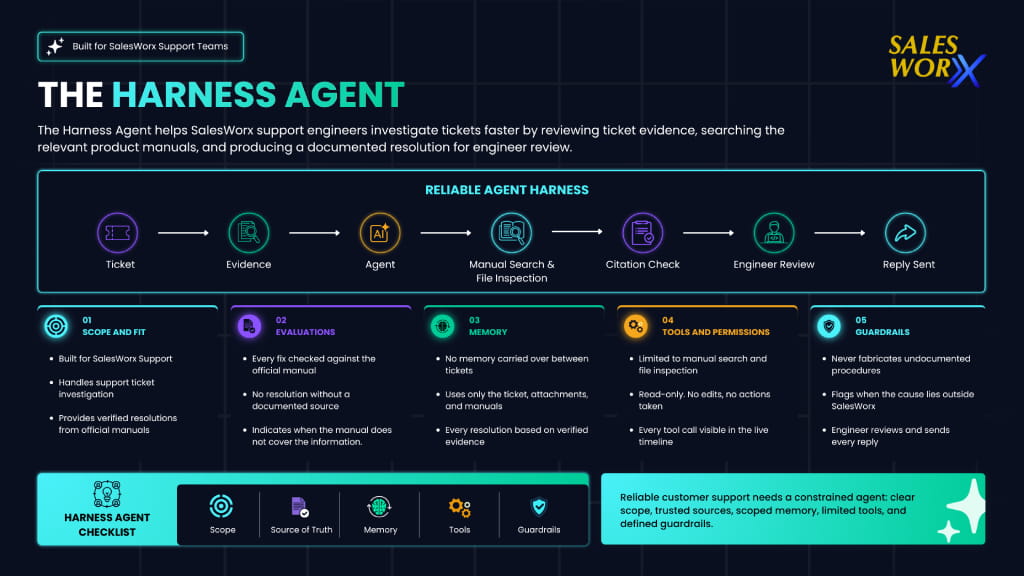
The agent is built around five principles that govern how it investigates a ticket and produces a resolution: a defined scope limited to SalesWorx support; a fixed source of truth in the official product manuals; read-only tool access with no ability to modify tickets or records; operational guardrails that prevent fabricated procedures; and mandatory engineer review before any reply reaches a customer.
These principles exist because the output of a support agent is only useful if it can be trusted. Speed alone is not sufficient.
Why the Fix Is Always Documented
The Harness Agent does not generate answers from general knowledge. Every Fix is sourced from the official SalesWorx product manuals, with the agent automatically routing each ticket to the correct manual set based on the product line. The documented procedure is extracted and returned with a citation linking directly to the relevant manual page.
When the manual does not cover an issue, the agent says so. It identifies what additional information the support team needs to gather from the customer rather than producing a procedure it cannot substantiate.
How It Handles Evidence
A support ticket carries more information than the description alone. The Harness Agent reads the full comment thread, preserving error codes, transaction amounts, and timestamps exactly as they appear. Every screenshot and video attached to the ticket is analysed as visual evidence. Log files, CSV exports, and Excel reports are searched automatically, with the agent extracting only the entries relevant to the issue rather than processing the entire file.
What the Support Engineer Sees
The engineer does not wait for a single output to appear. A live timeline shows each step of the investigation as it happens: the comment thread being read, screenshots and video being analysed, files being searched, manual sections being retrieved. By the time the resolution appears, the engineer has already followed how it was built.
PLANNING
✓ Fetching ticket · 7 comments, 0 images, 1 file
✓ Digesting comments · 348 chars
✓ Grounding on LLM Wiki · grounded (3.8k chars)
EXECUTION
✓ Sandbox environment · 1 file loaded into /work
• Downloading attachment: Full_Brand_List….txt
✓ Searching Van Sales manuals
• “How does Van Sales post stock data to external systems?”
✓ Inspecting attachment
• rg -n “AJB|AJO|AJR” att_…_Full_Brand_List….txt
✓ Tool result · matched 3 lines
SYNTHESIS
✓ Writing Cause / Fix / Reply · 1.7k chars, 1 source
What the Harness Agent Does Not Do
The Harness Agent is read-only. It cannot modify a ticket, update a record, or take any action within SalesWorx. The resolution it returns is a recommendation. The engineer decides whether to act on it and takes responsibility for sending the reply.
When the root cause of an issue lies outside SalesWorx, on a customer’s server configuration or a third-party system, the agent identifies this directly rather than producing a fix that would not solve the problem.
Summary
Support tickets that previously required up to an hour of investigation now resolve in under three minutes. The Harness Agent reads all available evidence, routes each ticket to the correct SalesWorx product manual, and returns a cited, structured resolution the engineer can send with confidence. The agent is available now to SalesWorx customers across Van Sales, Credit Sales, and DigIsal operations.